
AI Product Video Consistency: Why Logos Shift, Colors Drift, and Text Breaks
By Mohammed Zaid
Last updated 19 October 2026You generate a clip from your product photo. Motion looks great. Hook is clean.
Then you look again. Logo is a little off. Color isn’t quite your product. Label text is kind of mushy.
If you publish that, the customer notices when the box arrives. It doesn’t match the ad. That’s not a creative issue — that’s trust.
This guide covers why that happens, and what to do before you hit publish.
Start here first: AI Video Ads for Ecommerce guide. Then come back — this is the diagnostic layer.
At a high level, AI video models create or transform visuals by predicting what looks plausible from what you gave them. They don’t know your kerning, your exact amber, your font, your matte coating. They’ve learned from many similar products, so they fill gaps with something that looks right — but isn’t your product.
That is the core challenge behind AI product video consistency.
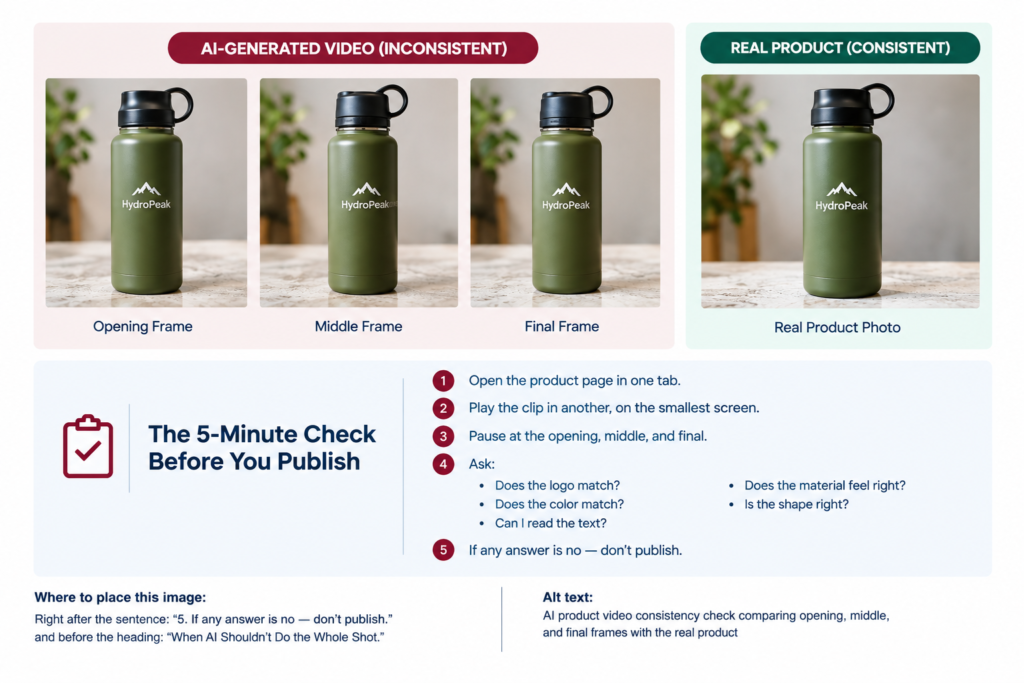
What it looks like: Logo stretches, shifts, duplicates, or fades.
Why it happens: The model can treat the logo more like a visual pattern than a locked brand asset. During motion, it may effectively redraw or reinterpret that detail.
Fix: Composite a clean PNG logo in post — this is often the most reliable approach when accuracy is critical.
If it has to stay in-scene, keep the clip short. Try not to pan directly across the logo. For PDPs, use AI for movement, then lay the real logo back on top where it has to be perfect.
AI can subtly change the color of a product even when the source image looks accurate.
What it looks like: A product appears slightly warmer, cooler, brighter, darker, or simply different from the real item.
Why it happens: The model is generating a plausible visual sequence rather than measuring and preserving your exact brand color.
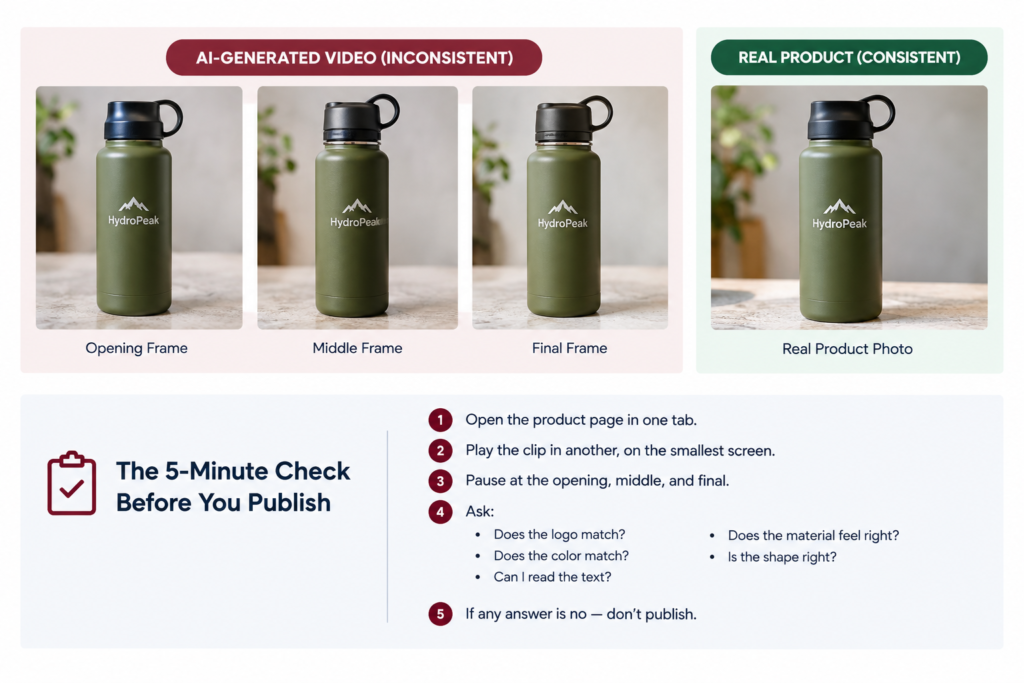
Start with the pre-generation checklist for product photos. Compare the generated result against the actual product or live product page, not just your original source image.
For important brand colors, consider correcting or locking the color in post. sRGB is the common color standard for web images. Check the result on both a phone and a laptop before publishing.
Packaging text is one of the easiest details for an AI-generated video to get wrong.
What it looks like: Label copy becomes blurry, letters change, words become unreadable, or small text turns into something that only looks like writing.
Why it happens: Video models can reproduce the visual appearance of text without reliably preserving every character.
If the text is not essential to the shot, remove or minimize it in the source. Add important copy later as real text — such as captions, product names, prices, or CTAs.
For packaging that needs to remain perfectly accurate, use the real product image and let AI handle the surrounding environment or motion instead.
AI can also reinterpret what a product is made from.
What it looks like: Matte becomes glossy. Fabric looks slightly plastic. Brushed metal starts looking like chrome.
Why it happens: The model is trying to create a visually believable result, and it may substitute a material or finish that looks plausible.
If your tool supports material instructions, describe the finish clearly — for example, matte finish, soft-touch, brushed aluminum, or not glossy.
Use a reference image that shows the material clearly. Reject clips that change the finish, especially when the material itself is part of the product’s identity.
A tighter crop can also reduce opportunities for the model to reinterpret unnecessary details.
Sometimes the product itself slowly changes shape.
What it looks like: A bottle becomes slightly taller. A box becomes wider. A cap changes proportion.
Why it happens: The model is predicting the frames between your starting and ending visuals. Small prediction differences can accumulate during motion.
For consistency testing, around 3 seconds is a useful practical starting point, not a universal rule.
Avoid unnecessary full 360-degree reveals when exact shape matters. Instead, focus the shot on the cap, label, texture, or another controlled detail.
If the exact product shape is critical, real footage remains the safest option. AI can then be used for atmosphere, motion, or creative variations around that verified footage.
Even when the product itself looks right, the lighting can make it feel wrong.
What it looks like: Shadows move unexpectedly, lighting flickers, highlights change, or the product appears to float.
Why it happens: The model is generating a plausible scene rather than reproducing the exact physical lighting setup from a studio.
Start with relatively flat, even lighting using the product photo prep checklist.
You can introduce more dramatic lighting after generation where appropriate. Before publishing, preview the result on a phone and in the feed environment where customers will actually see it.
| Failure | Likely Cause | Immediate Fix | Prevention |
| Logo distortion | Pattern reinterpreted frame by frame. | Composite static logo in post where exact | Keep logos sharp in source; plan overlay |
| Color drift | Interpolation + color handling | Compare to real product, not just source | Clean source; check on two devices |
| Text corruption | Text rendered as texture | Add text in post | Remove non-essential text from source |
| Texture shift | Material reinterpreted as plausible alternative | Reject clips that change finish | Describe material; tighter crop |
| Shape drift | Prediction errors accumulate | Keep clips shorter for testing | Avoid full reveals when not needed |
| Lighting issues | No real light source knowledge | Simplify source light | Flat source; add drama in post |
Bookmark this. Use it when a clip fails your product check.
Not sure whether your generated clip looks realistic enough to publish? Read our guide on How to Spot a Fake-Looking AI Product Video Before You Publish It for a practical screening method and fixes for common visual failures.
Some products just shouldn’t be fully AI.
Detailed logos. Precise brand colors. Legible packaging. Specific finishes. Anything with regulated labeling — supplements, cosmetics, food — that stuff may be better served by a hybrid approach.
Real product footage + AI environment, motion, or variation.
That’s not a failure. That’s knowing where AI actually helps.
We break down the hybrid workflow in our AI Video Ads for Ecommerce.
Check the labeling rules for your product and market. This is general information, not legal advice.
Use the AI Video Ads for Ecommerce guide to build your workflow from product photo preparation to final ad production. Next, read our guide to AI video ads for ecommerce.