
AI Video Ads for Ecommerce: How to Turn Product Photos Into Shopify Video Ads That Still Look Like Your Product
Let’s be direct. Turning a product photo into a video ad with AI is easy. Making it look exactly like your product is hard.
Trust breaks fast. If your ad shows one thing and your box shows another, you lose more than a sale.
Product accuracy comes first. Everything else is decoration.
Your product photos are already most of the work
You paid for the shoot. That’s your most valuable asset. When you start with a real product photo, the AI isn’t guessing. It has the shape, color, logo, texture. That makes AI video ads for ecommerce more reliable because the starting point is your actual product.
Why AI Video Ads for Ecommerce Fail the Product Test
Getting movement is easy. Keeping product accuracy is what makes AI video ads for ecommerce harder. Matte turns glossy, logo shifts, texture disappears, text becomes unreadable. A simple rule: No video should go live without a side-by-side check against the product page.
That is why AI video ads for ecommerce need a product-accuracy check before they are published.
The workflow that actually works for Shopify brands
- Start with your best shot
Choose a clear, well-lit photo that shows the product’s real shape, color, logo, and important details. Avoid blurry images, heavy filters, or angles that hide key features. - One sentence: What should someone understand?
Choose one product benefit or customer problem for the video. For example, show how a leakproof water bottle prevents spills during a commute instead of trying to explain every feature at once. - Lock the first frame
Choose the opening frame carefully because viewers may see it before the motion begins. Keep the product clearly visible, and check that its shape, colour, logo, and proportions match the original photo. - Generate short clips, around 3 seconds each
Treat three seconds as a starting point, not a fixed rule. Generate short clips for individual actions, then choose the clearest results and adjust the final duration to suit the message, platform, and pace of your ad. - AI gives you ingredients. Not a finished ad.
Review every generated clip against the original product photo and product page. Reject results that change the product’s shape, colour, logo, materials, or features. If a detail looks wrong, try a simpler motion prompt or use the original photo in the edit instead. - Make variations
Test one change at a time, such as the opening hook, product angle, background, or benefit shown. Keep the audience, offer, and other major elements consistent where possible, then compare results using the same performance metrics and testing period.
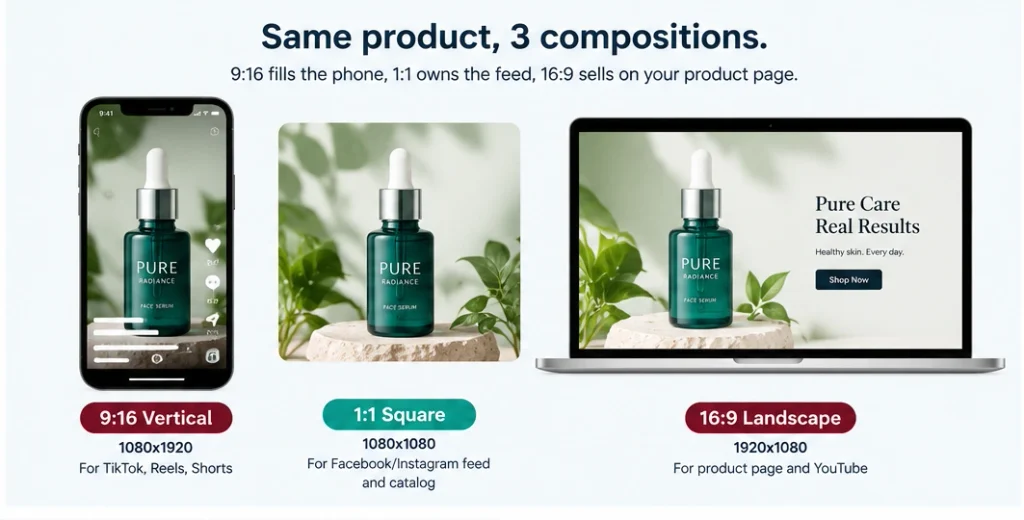
Video Ad Formats: You Need 3 Compositions, Not 1 Crop
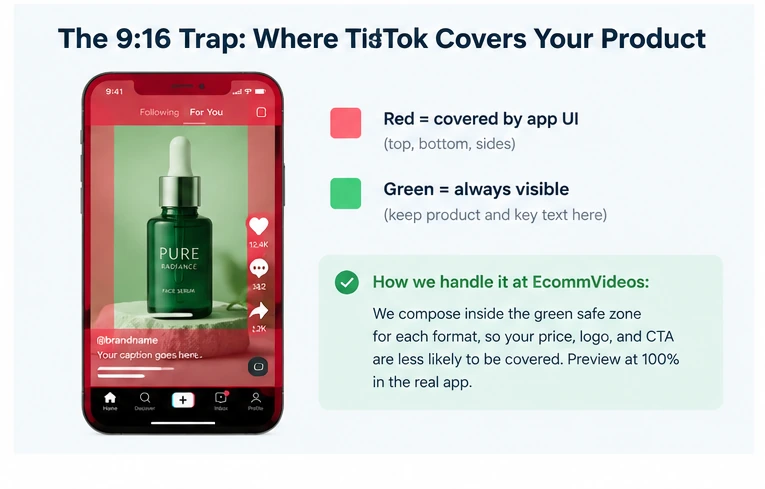
The 9:16 Trap
We compose inside the green safe zone for each format, so your price, logo, and CTA are less likely to be covered. This is especially important on mobile, where platform interface elements can overlap parts of the video and make important information harder to see.
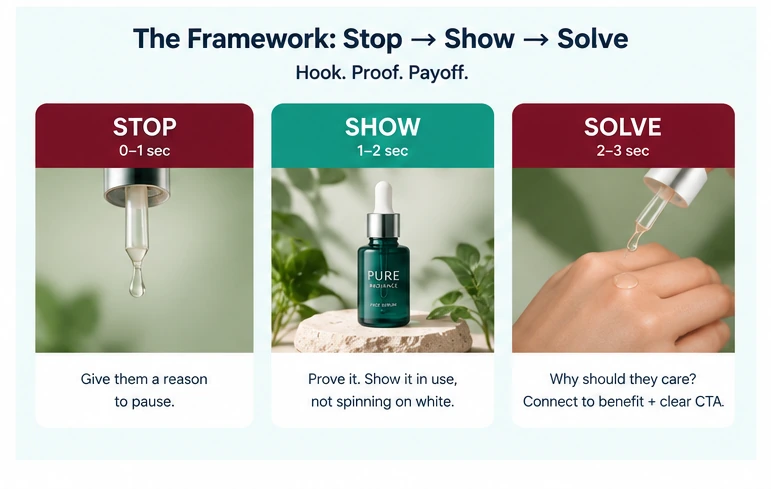
The Framework: Stop → Show → Solve
The best short ads do three things in order: stop the scroll, show the product clearly, and solve one specific customer problem. Keep each video focused on one idea instead of trying to explain everything at once.
Before You Publish — Checklist
• Product looks accurate in the first frame
• Logo and packaging stay consistent
• Hook is clear within the first few seconds
• One video communicates one main idea
• Price, logo, and CTA stay inside the safe zone
• Video is exported in the correct format for each placement
• Captions are readable on mobile
• Final video works without relying on sound
How we test without burning budget
Start with a small test instead of committing a large budget to one creative. Test different hooks and product angles, watch which versions earn attention and clicks, then put more budget behind the concepts that show promise. Keep the product, offer, and audience consistent while testing the creative itself. That makes it easier to understand whether the hook, visual, or message is actually driving the difference.
FAQ
Will AI change my product color or logo?
What format should I start with?
How long should my ad be?
Do I need video editing skills?
Will this work for my product category?
What’s the biggest mistake?
Turn 1 Product Photo Into Multiple Placement-Ready Video Variations